agents
Part of the AI system design curriculum
Agent Fundamentals
From single LLM calls to autonomous agents: planning, tool use, memory, and the control loop.
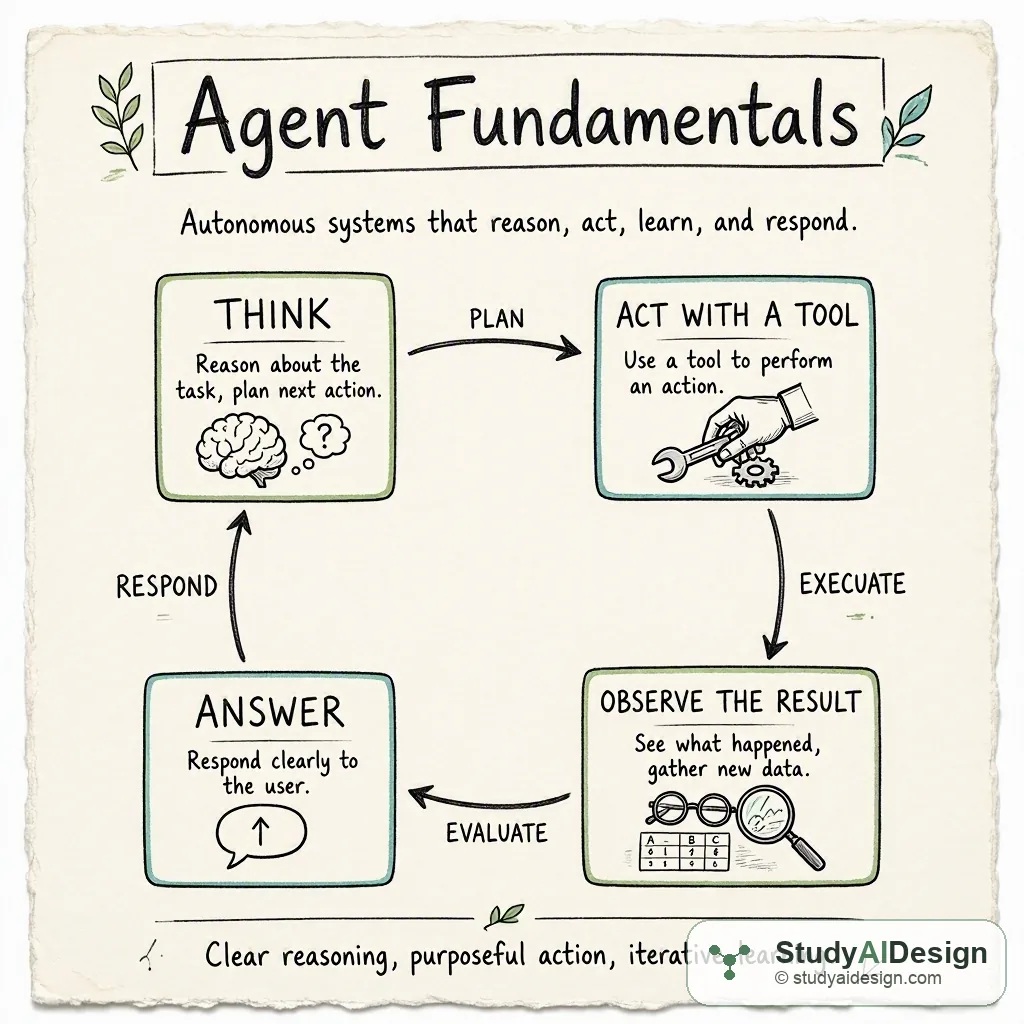
A single LLM call is a function: fixed input in, text out. An agent is a different kind of thing: a system that runs an LLM in a loop, takes actions, observes what happens, and decides what to do next based on those observations. The difference matters enormously in practice. A function call answers questions. An agent completes tasks; a task may require dozens of intermediate steps, most of which you cannot anticipate when you write the code.
What makes agents tractable is that LLMs are good at both planning ("what should I do next?") and text-based reasoning about tool outputs ("does this search result answer my question?"). The control loop exploits both capabilities in alternation. The hard part is not the loop itself, which is a few dozen lines of code. The hard part is making each step reliable enough that many steps chained together still produce a correct result.
TL;DR
- The ReAct loop cycles through Think (LLM reasons about next action), Act (execute tool call or emit answer), Observe (receive tool output or environment change), and Loop (feed observation back as context); this pattern unlocks complex multi-step behavior.
- Tools extend agent capabilities through structured function calls; tool descriptions are part of the prompt, and poorly written descriptions cause incorrect tool selection.
- Agents can fail silently when tools return empty or unexpected results; the model may confabulate to fill gaps rather than admit uncertainty, so log every tool invocation with arguments and return values.
- Set a hard max_steps ceiling to prevent runaway loops; agents on complex tasks consume 10x to 100x more tokens than single calls, so track cumulative cost per session.
Key tradeoffs: Autonomous agents handle open-ended tasks but introduce silent failure modes; each step compounds error probability, and reliability drops exponentially with chain length.
The Agent Control Loop
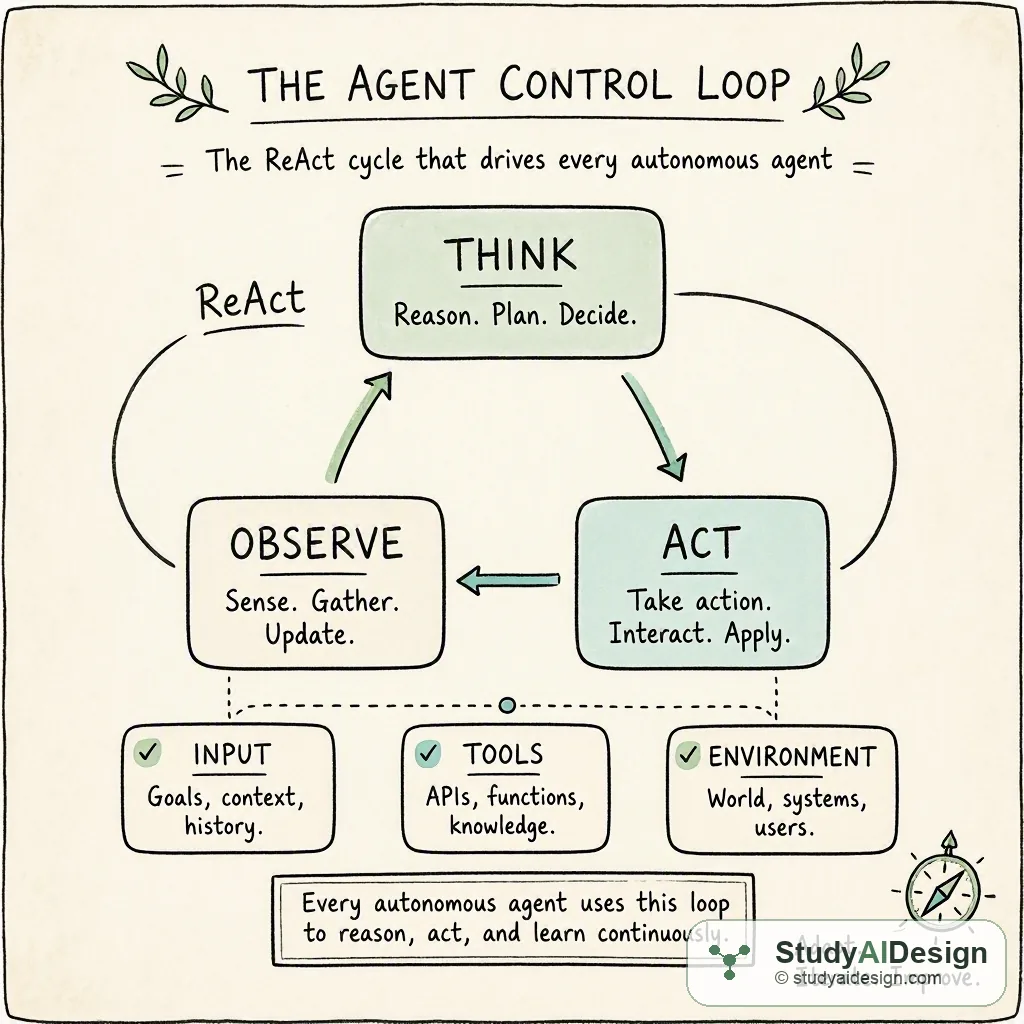
Every agent, regardless of how it is built or which model it uses, is built around some version of the same cycle:
- Think: use the LLM to reason about the current state and decide the next action
- Act: execute a tool call, write to memory, or emit a final answer
- Observe: receive the result: tool output, environment change, or user input
- Loop: feed the observation back as context and repeat
This is often called the ReAct loop, after the formalization by Yao et al. (2022): the model emits a structured chain of reasoning ("I need to check the current exchange rate") followed by a tool invocation, then incorporates the result before reasoning again. It is a simple idea that unlocks surprisingly complex behavior.
How ReAct Is Structured in a Prompt
In text-based ReAct, the system prompt tells the model to respond in a specific format on every turn. A minimal instruction looks like this:
You have access to the following tools: [tool list].
On each turn, respond with:
Thought: your reasoning about what to do next
Action: the name of the tool to call
Action Input: a JSON object of arguments
Wait for the Observation before continuing.
When you have a final answer, use Action: finish.
The model then produces output like:
Thought: I need papers on LLM watermarking from 2023 onwards. I will start with a keyword search.
Action: academic_search
Action Input: {"query": "LLM output watermarking", "year_min": 2023, "max_results": 10}
The surrounding infrastructure parses the Action and Action Input lines, calls the corresponding function, and injects the result as a new Observation: line before the next model turn. The model never directly calls anything. It writes text that a parser converts into function calls. When you debug a broken ReAct agent, you are almost always debugging either the parser (it misread the model's output format) or the observation (the tool returned something the model did not expect).
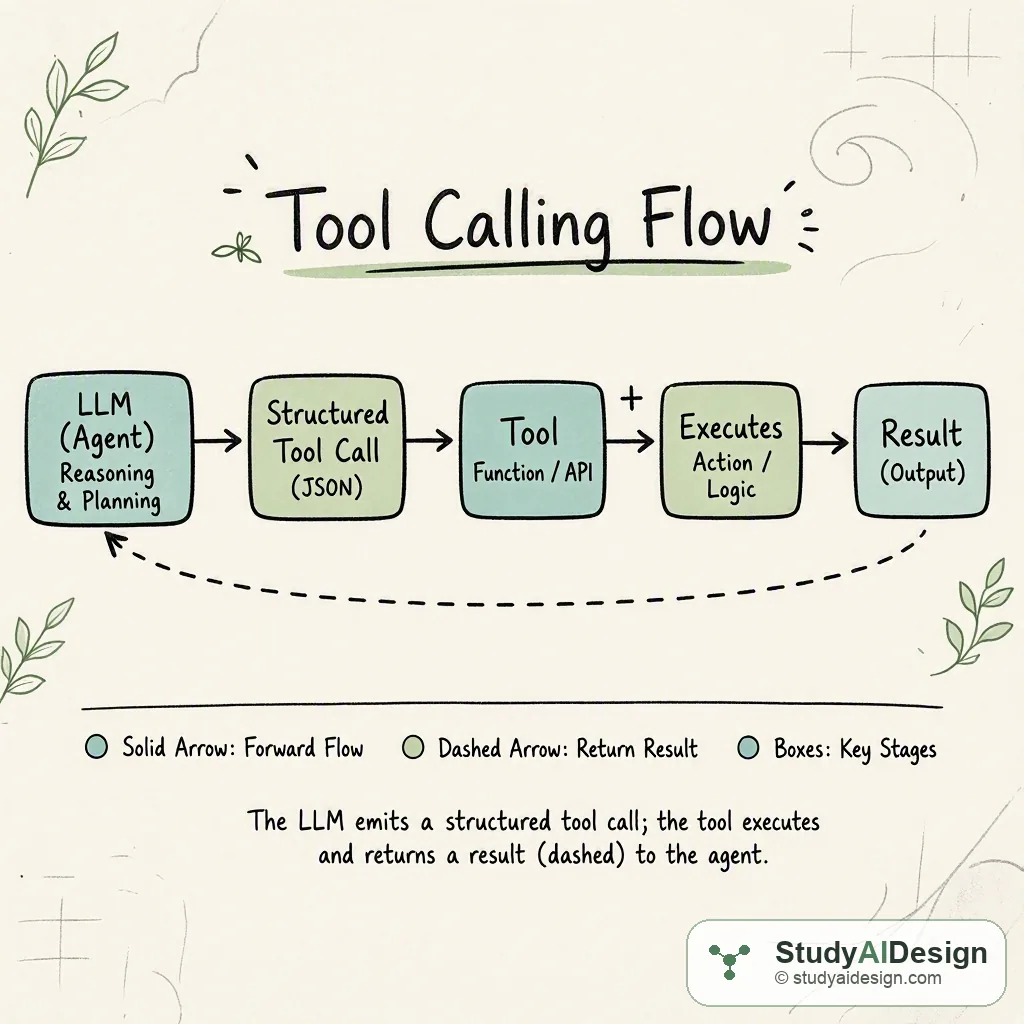
Modern APIs like OpenAI's tool-calling and Anthropic's tool use skip the text parsing layer. The model emits a structured JSON tool call object, the runtime executes it, and the result is injected as a typed tool role message. This is more reliable than text-based ReAct because there is no parser to break, but the underlying loop is identical.
def run_agent(goal: str, tools: dict, max_steps: int = 15) -> str:
"""Minimal agent loop. `tools` maps name -> callable."""
history = [{"role": "user", "content": goal}]
for step in range(max_steps):
response = llm.chat(
messages=history,
tool_schemas=[describe(t) for t in tools.values()],
)
# If the model signals it is done, return the answer
if response.finish_reason == "stop":
return response.content
# Otherwise, execute the requested tool call
call = response.tool_call
result = tools[call.name](**call.arguments)
# Append both the model's decision and the tool's result to history
history.append({"role": "assistant", "tool_call": call})
history.append({"role": "tool", "name": call.name, "content": str(result)})
# Hard stop: always set a budget
return f"Incomplete after {max_steps} steps. Last output: {history[-1]['content']}"The max_steps ceiling is not optional. An agent without a step budget is a potential runaway process. Set it based on your worst-case estimate of task complexity, and treat hitting the ceiling as an error to log, not just a timeout to ignore.
This loop also does not handle partial success, cost accounting, or intermediate checkpointing. In a real system, you want to persist the history list after each step so a crash does not force a full restart. You also want to track cumulative token spend, because an agent on a complex task can consume an order of magnitude more tokens than a single call.
Tools: Extending What an Agent Can Do
Without tools, an agent is just a verbose chatbot. Tools are the interfaces through which an agent acts on the world:
- Information retrieval: web search, database queries, document lookup, API calls
- Computation: code execution, calculators, data transformation pipelines
- Side effects: sending messages, writing files, creating calendar events, submitting forms
Tools are described to the model via a schema: a name, a natural-language description, and typed parameter definitions. The LLM uses the description to decide which tool to call and what arguments to pass. This means tool descriptions are effectively part of your prompt, and poorly written descriptions are a leading cause of incorrect tool selection.
Think of the model as a skilled project manager who has never personally done hands-on work. The manager knows how to delegate, sequence tasks, and synthesize outcomes, but every physical operation must go through a specialist. The specialists are your tools, and how well the manager can brief them depends entirely on how clearly you have described what each one does.
Tool Schema Design and Validation
A tool schema in JSON Schema format looks like this:
{
"name": "academic_search",
"description": "Search academic databases for peer-reviewed papers by keyword or phrase. Returns titles, authors, publication years, DOIs, and citation counts. Use this tool for finding research papers. Do not use it for general web content or recent news.",
"parameters": {
"type": "object",
"properties": {
"query": {
"type": "string",
"description": "Search keywords or a natural language research question. Example: 'LLM output watermarking techniques'"
},
"year_min": {
"type": "integer",
"description": "Earliest publication year to include, inclusive. Example: 2023"
},
"max_results": {
"type": "integer",
"description": "Maximum number of results to return. Must be between 1 and 50.",
"default": 10
}
},
"required": ["query"]
}
}Several details here are worth making explicit. The description says "Do not use it for general web content or recent news" because the model needs negative guidance as much as positive guidance. Without it, the model may call academic_search when it wants a news article, get zero results, and spiral into retries. The parameter descriptions include example values because models produce fewer schema mismatches when they can see a concrete example of what a valid argument looks like. The required array is enforced at the schema level, not just described in prose.
At execution time, validate incoming arguments against the schema before calling the underlying function. When a model produces a malformed call (wrong type, out-of-range value, missing required field), a schema validator returns a structured error like "year_min must be an integer, got string '2023'" rather than a Python traceback. The model can parse a structured error and retry with corrected arguments. It cannot usefully parse a traceback.
For tools with side effects, you can add a confirm_message field to the schema that your runtime inspects before executing. This gives you a lightweight human-in-the-loop approval gate for high-consequence actions without restructuring the agent's logic.
Memory: What the Agent Knows Over Time
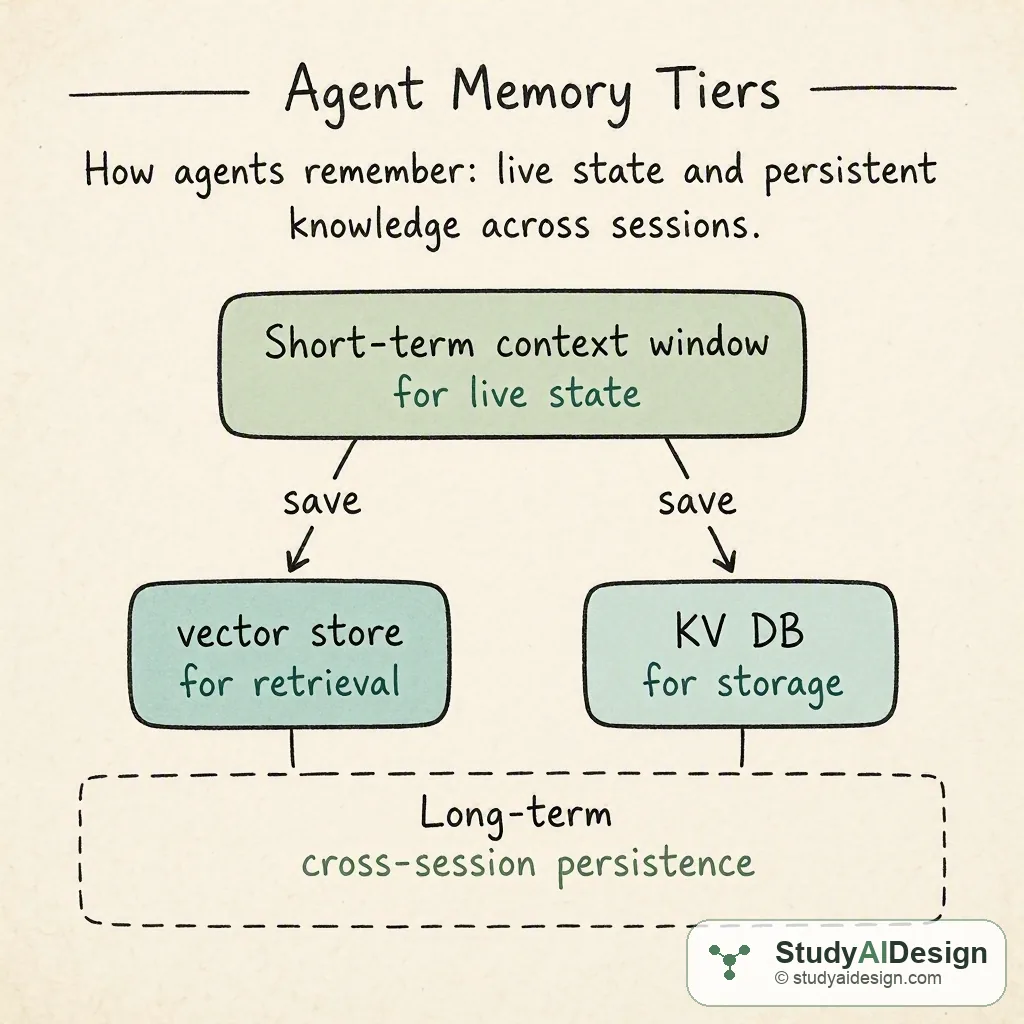
Within a single agent run, the conversation history is the agent's working memory. But this has two hard limits: context windows are finite, and they reset when the session ends.
Production agents need external memory:
| Memory type | Storage | Access | Best for |
|---|---|---|---|
| Short-term / working | Context window | In-prompt | Current task state; immediate tool outputs |
| Episodic / semantic | Vector database | Similarity search | Past interactions; personalization across sessions |
| World state | Key-value or relational DB | Exact lookup | Confirmed facts, order IDs, approval statuses |
Choosing the wrong memory type creates subtle bugs. Storing a user's confirmed budget as an episodic embedding means retrieval is approximate. Sometimes the right value surfaces; sometimes a similar but different value does. Store it as an exact key-value entry and look it up deterministically.
Short-Term Memory Management
The context window fills up as the agent accumulates tool outputs. A 20-step agent that retrieves 2,000 tokens per step exhausts a 128K context window before finishing. The standard mitigations are summarization (compress earlier exchanges into a shorter summary and drop the raw messages) and a sliding window (keep the N most recent messages and discard older ones).
Summarization preserves more semantic content but adds a model call and its associated cost. Sliding windows are free but can drop information the model later needs. For agents where the entire history matters, such as legal research or code debugging sessions, summarization is worth the cost. For agents where only the recent state matters, such as form-filling or step-by-step workflows, a sliding window is usually sufficient.
A practical pattern: keep the original goal verbatim at the top of the context, followed by the most recent summary, followed by the K most recent raw exchanges. Regenerate the summary every M steps. This keeps context bounded while preserving the full arc of the task.
Long-Term and External Memory
Long-term memory persists across sessions and is retrieved selectively, not loaded wholesale into the context window. The two dominant storage patterns are:
Vector stores for fuzzy recall. You store chunks of past interaction as embeddings and retrieve the top-k most similar chunks at the start of a new session. This works well for "what did the user prefer last time?" or "find a past solution similar to the current problem." The failure mode is false retrieval: a chunk that looks semantically similar but is factually different enough to be misleading. Always include the retrieval score in what you log; if the top result is below a similarity threshold, treat it as no match rather than as a weak match.
Structured stores for exact facts. User preferences, confirmed settings, completed task state, and any value that needs 100% recall accuracy belong in a key-value or relational database. The agent looks up user:{id}:budget and gets the exact number, with no approximation and no recall failure.
A real memory system combines both: a vector store for context and style personalization, a relational store for ground-truth facts, and a compact summary of the most recent session loaded at startup. When deciding where to put a piece of information, ask: would a wrong value here cause a silent failure? If yes, use exact storage.
Planning and Agency Levels
Not every autonomous system needs a full planning layer. A useful spectrum:
| Level | Name | Behaviour | When to use |
|---|---|---|---|
| L0 | Fixed pipeline | Hardcoded sequence of LLM calls | Maximum predictability, no real agency |
| L1 | Tool selection | Model picks which single tool to call; workflow is predetermined | Simple routing tasks |
| L2 | ReAct loop | Model decides next action based on accumulated observations | Most "answer a complex question" use cases |
| L3 | Goal decomposition | Model creates an explicit dependency-graph plan before execution; can revise on failure | Path to goal cannot be known in advance |
| L4 | Ambient / background | Runs continuously, monitors signal streams, intervenes on threshold | Infrastructure commitment; significant reliability and cost implications |
Match the level to the task. Most "answer a complex question" use cases are well-served by L2. L3 is appropriate when the path to the goal genuinely cannot be known in advance. L4 is an infrastructure commitment with significant reliability and cost implications.
How Planning Works at L3
An L3 planner uses a two-phase approach. In the planning phase, the model is prompted to produce a structured plan before taking any actions. A typical planning prompt ends with: "Before calling any tools, write a numbered plan listing each step you will take and the tool you expect to use. Identify which steps depend on earlier steps." The model produces something like:
Plan:
1. Search for recent papers on LLM watermarking [tool: academic_search]
2. Retrieve citation counts for each result [tool: get_citation_count] depends on: 1
3. Select top 3 by citation count [no tool] depends on: 2
4. Fetch abstract for each selected paper [tool: fetch_abstract] depends on: 3
5. Synthesize comparison [no tool] depends on: 4
In the execution phase, the agent works through the plan, substituting real outputs for each dependency. When a step fails or produces unexpected results, the agent may need to replan. Replanning is expensive because it requires re-invoking the planning prompt with updated information, but it is far better than continuing with a plan built on wrong assumptions.
A lighter alternative to full replanning is plan patching: the model annotates a failed step and proposes a single replacement step. This preserves the rest of the plan and is cheaper than regenerating everything. It works well for local failures (a single tool returned an error) but not for global failures (the entire approach was wrong).
Common Failure Modes
Understanding where agents break down is as important as understanding how they work.
Goal Drift
On long-running tasks, each intermediate step moves the agent slightly away from the original objective until, many steps later, the agent is solving a subtly different problem. It "succeeds" at each local step while globally diverging.
A concrete example: an agent tasked with "find and summarize the three most relevant papers" starts with a keyword search, then gets drawn into a tangential topic in the results, searches that, follows a citation chain, and eventually produces a high-quality summary of papers that are only loosely related to the original goal. Every individual action was locally reasonable.
The mitigation is goal anchoring: keep the original objective verbatim in the system prompt and periodically inject a progress check. A practical implementation is to add a step every N turns that asks: "Your original goal was: [goal]. Assess whether the actions you have taken so far are directed at this goal. If you have drifted, describe the correction needed." This is cheap and surprisingly effective. A secondary observer model, a smaller and cheaper model scoring each step against the goal, can raise a replan flag before drift becomes irrecoverable.
Tool Proliferation
An agent given 30 tools will use them indiscriminately. Too many tools increase prompt length, confuse the router, and produce noisy logs that are hard to debug. Curate tool sets per agent role: a research agent does not need a calendar write tool. A scheduling agent does not need a code execution sandbox.
Beyond confusion, tool proliferation increases attack surface. Each tool with side effects is a place where a prompt injection attack can cause unintended consequences. An agent that can send email, write files, and call external APIs simultaneously has a much larger blast radius than one restricted to read-only operations. The practical rule is to give each agent the minimum tool set needed for its specific role. If an agent needs capabilities from two different domains, consider splitting it into two agents with a clean handoff between them.
Schema Mismatch
Smaller models and even some frontier models occasionally call tools with arguments in the wrong format, such as a string where an integer is expected, or a nested object where a flat dict is required. These fail at execution, not at reasoning, but the model may not realize the failure was its own and will retry with the same malformed arguments.
Always validate tool arguments against the schema before executing them, and return a structured error message (not a Python traceback) so the model can understand what went wrong and self-correct.
When schema mismatches are frequent, two things usually need fixing. First, the parameter descriptions may be unclear about the expected format. Adding a concrete example value to the parameter description reduces mismatch rates noticeably. Second, the model may not have enough context to construct valid arguments. If a tool requires an internal ID that only exists in a previous tool's output, make sure that prior output is still in the context window when the model calls the dependent tool.
Reliability Compounding
This is less a failure mode and more a mathematical reality that shapes agent design. If each step in a pipeline has independent success probability p, an n-step agent succeeds end-to-end with probability p raised to the power n. Three steps at 99% each gives 97% end-to-end success. Ten steps at 90% each gives 35%. Fifteen steps at 95% each gives 46%.
The implication is that the reliability bar for individual tools and model calls must be high for long agents to be practical in production. A tool that returns correct output 95% of the time sounds reasonable in isolation, but in a 15-step agent it brings end-to-end success below 50%. Invest heavily in making each individual step robust before adding more steps, and set a concrete reliability target (say, 95% end-to-end) and work backwards to figure out what per-step reliability that requires.
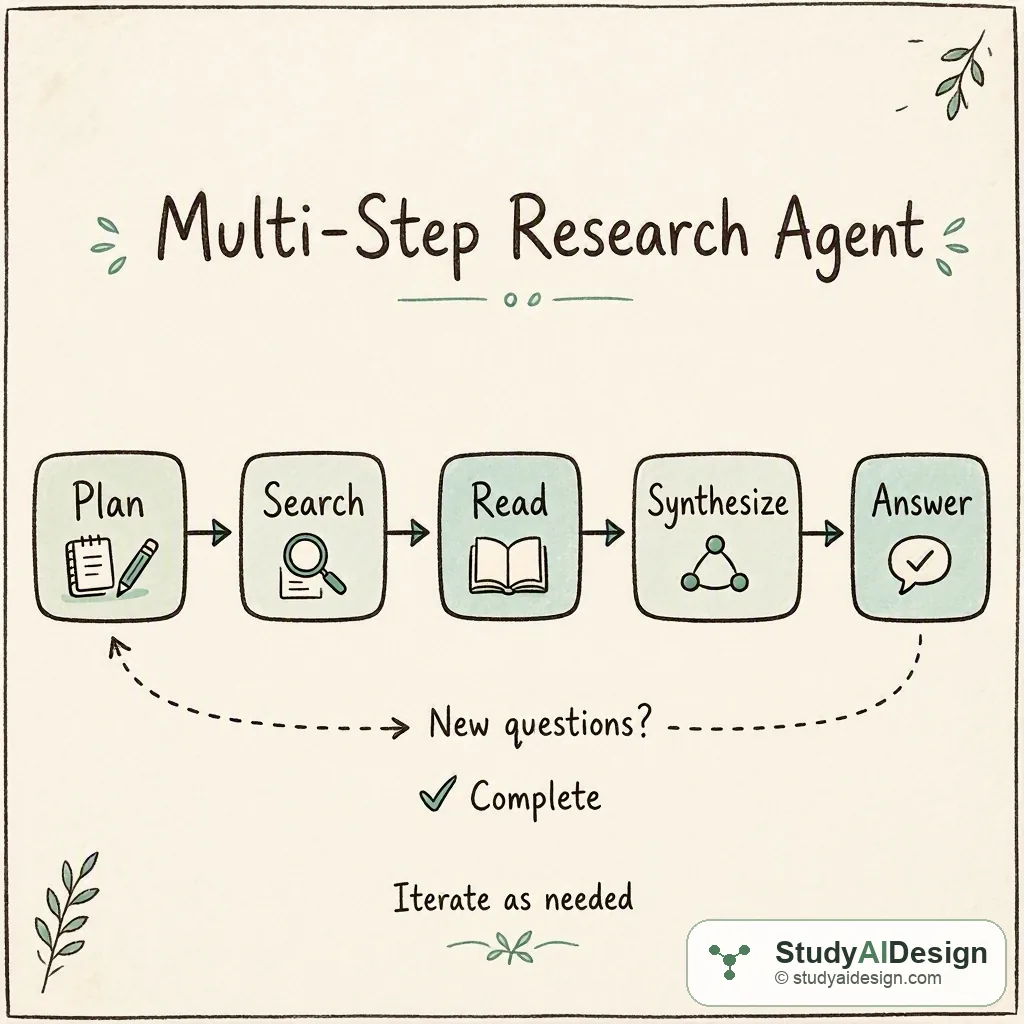
Worked Example: A Multi-Step Research Agent
Goal: "Find the three most-cited recent papers on watermarking LLM outputs, and summarize the key technique in each."
An L3 agent would handle this as follows:
- Decompose: The model identifies sub-tasks: search for papers, score by citation count, retrieve each abstract, synthesize
- Search: Calls
academic_search(query="LLM output watermarking", year_min=2023)→ returns a list of titles and DOIs - Filter: Calls
get_citation_count(doi=...)for each result, identifies the top three - Retrieve: Calls
fetch_abstract(doi=...)for each of the three, receiving structured text - Observe: Notices one abstract is in a foreign language; calls
translate(text=..., target="en")opportunistically - Synthesize: Produces a structured comparison of the three techniques, with DOI citations
The key property here is that step 5 was not planned in advance. The agent encountered an unexpected state and handled it with an available tool. That adaptability, grounded in real retrieved content with verifiable citations, is the capability gap between a chatbot and a useful autonomous system.
In a production version of this agent, step 2 might return 30 results, making it worth batching the get_citation_count calls in parallel to reduce latency. The translate call at step 5 requires that tool to already be in the agent's tool set even though it was not anticipated. These design decisions have to be made up front. Think about unexpected states the agent might encounter and make sure the tool set covers them, because you cannot add a tool to a running agent.
The memory implications are also worth noting. The list of 30 paper titles and DOIs from step 2 may be 3,000 tokens. The three full abstracts from step 4 may be another 4,000 tokens. By step 6, the context window contains the full conversation history plus all retrieved content. One mitigation is to store retrieved abstracts in a short-term key-value store keyed by DOI and inject only the relevant one at the synthesis step, rather than keeping all three simultaneously in the prompt.
Interview angle
Related Topics
How would you rate the quality of this article?
Keep going
Practice what you just read against real interview questions, or carry on through the curriculum.